
.webp)
Release by Bhavin Gunjariya
- APR 16, 2026
Consumers care about privacy and reliability. With on-device AI, user data (like speech or photos) never leaves the phone. For example, Apple’s latest iOS includes local language models for text prediction, and Meta uses its ExecuTorch engine to run AI in Instagram without servers. The benefits are clear:
· Privacy: Sensitive data stays on device, not sent to servers.
· Low Latency: No network round-trip means faster responses (sub-second feedback).
· Offline Access: AI features work even without internet, ideal for travel or remote areas.
· No Ongoing Costs: Once a model is embedded, there are no per-request API fees.
On-Device AI for React Native: Real-Time Voice Transcription
On the other hand, on-device AI has limits. Models must fit on the device (typically tens to hundreds of megabytes), and running them uses battery and CPU. In contrast, cloud AI can use huge models instantly but requires data upload and can be slower or cost money. The table below compares on-device vs. cloud inference:
Choosing the right approach depends on your app’s needs: use on-device if privacy or instant responsiveness is critical, and cloud if you need cutting-edge accuracy or minimal app size.
React Native + ExecuTorch: How It Works
For React Native apps, react-native-executorch is the key library. It wraps Meta’s ExecuTorch inference engine, letting you run models (like Whisper) in your JavaScript code without complex native builds. To get started, install the packages in your Expo or React Native project:
yarn add react-native-executorch react-native-audio-api
- react-native-executorch: Executes ML models on device (iOS/Android).
- react-native-audio-api: Captures high-quality audio for processing.
Next, import the speech model hook into your component. For example, to use the Whisper Tiny English model (small enough for mobile):
import { useSpeechToText, WHISPER_TINY_EN } from 'react-native-executorch';
function VoiceTranscriber() {
// Initialize the on-device Whisper model
const model = useSpeechToText({ model: WHISPER_TINY_EN });
// ...
}
This hook will automatically download the model (~150MB) and prepare it. You can show a loading spinner until model.isReady is true. Under the hood, ExecuTorch optimizes model inference for mobile (using neural engine/GPU), so your React Native UI stays snappy.
Example: Real-Time Speech Transcription
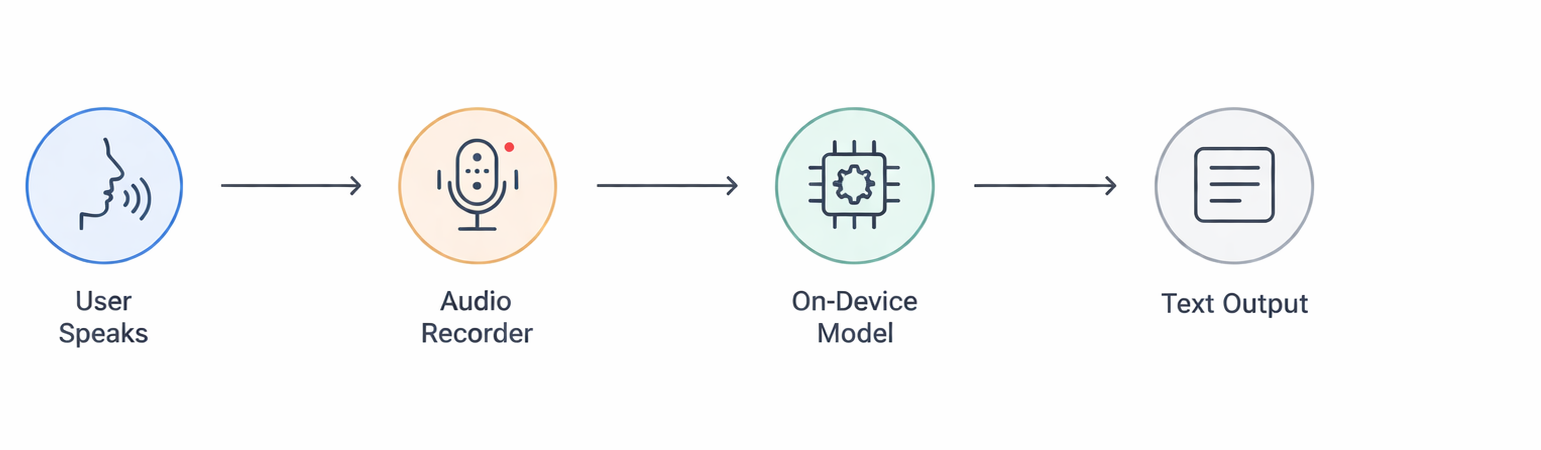
Below is a simplified flow of our example app, which converts speech to text entirely on-device:
flowchart LR
User --> Microphone[(Microphone)]
Microphone --> Recorder[Audio Recorder (100ms chunks)]
Recorder --> Model[ExecuTorch Whisper Model]
Model --> TextOutput[Text Display in App]
With the model initialized, capture audio and feed it to the model in real time. For instance, configure the audio recorder for 16kHz (Whisper’s sample rate) and 100ms chunks (to balance latency and quality). Then handle the audio callback:
// Pseudo-code inside a component
recorder.onAudioReady(({ buffer }) => {
// Convert Float32Array to number array
const audioChunk = Array.from(buffer.getChannelData(0));
// Feed the chunk to the model for streaming transcription
model.streamInsert(audioChunk);
});
// Start or stop recording with a button
if (!model.isGenerating) {
recorder.start();
await model.stream(); // Runs inference until stopped
} else {
recorder.stop();
model.streamStop();
}
When model.stream() runs, the Whisper model processes each incoming chunk and outputs text. The library provides model.committedTranscription (finalized text) and model.nonCommittedTranscription (interim text) so you can update the UI continuously. The result is instantaneous captioning of your speech without any network calls.
Practical Tips & Pitfalls
· Model Size Management: Keep models small enough to bundle or download. Use optimized variants (like Whisper Tiny) or quantize weights. Large models (>500MB) may bloat app size or fail on low-end devices.
· Fallback Strategies: For long or complex tasks, consider a hybrid approach: do simple, common tasks on-device and send only complex queries to the cloud. This balances privacy with heavy-lift AI.
· User Experience: Inform users about large downloads or battery use. For example, show model download progress, and allow pausing transcription to save battery. Use short audio buffers (100ms) for responsiveness.
· Permissions & Configuration: Ensure microphone permissions are correctly set (e.g. Expo app.json or native config). Configure the audio session for speech (e.g. playAndRecord on iOS) for best quality.
· Performance Testing: Test on a range of devices. A flagship phone may handle Whisper in real time, but a budget device might lag. Profile CPU/GPU usage and adjust chunk sizes or processing as needed.
Case Study: A medical app uses on-device Whisper transcription so patients’ voice data (symptoms) never leave the device, meeting strict privacy regulations. Users can speak to the app even in remote clinics without wifi, and get instant, private transcriptions (a cloud-only solution would have violated HIPAA and required constant connectivity).

Connect with our experts to discuss your ideas and discover the right solutions tailored to your business needs.
Join our newsletter
.svg)
.svg)