
Release by Bhavin Gunjariya
- Jul 15, 2026
How server-side rendering (SSR) boosts performance, SEO and prepares your site for AI-driven search.
Executive Summary
Will AI replace human designers?
In recent years the web has swung from server-rendered pages to heavy client-side apps, but today speed and crawlability are king again. Google now treats Core Web Vitals (CWV) — real-user speed metrics like LCP and INP — as ranking factors【19†L35-L38】. At the same time AI-driven search (Google’s AI mode, ChatGPT, etc.) is on the rise. One study predicts that by 2028, more traffic may come from AI-powered search than traditional queries【28†L154-L162】. In this environment, delivering fully-rendered HTML quickly has major business value: better SEO, higher conversion, and a smoother UX. Modern frameworks like Next.js have made SSR (and hybrid models) easier than ever. This article explains why SSR is back in demand and how to leverage it (and related techniques like SSG, ISR and edge rendering) to satisfy performance, SEO and AI-search needs.
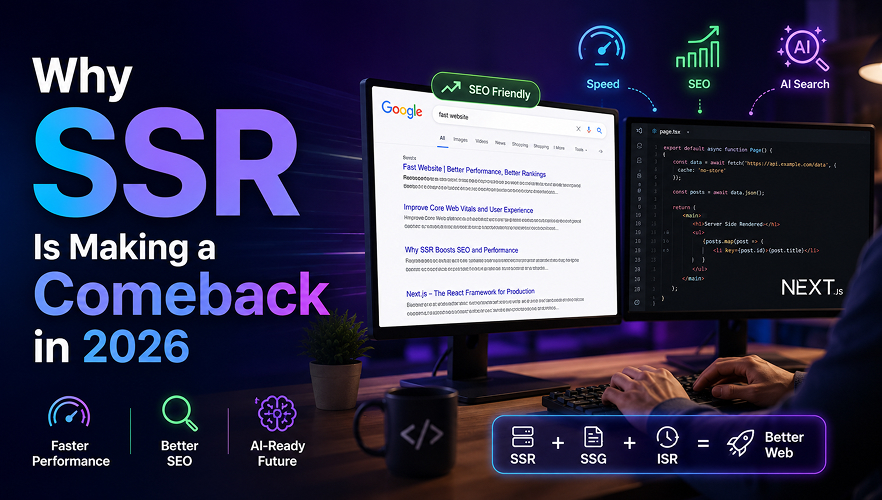
【51†embed_image】 Figure: A developer’s laptop displaying a Google search page and code editor, symbolizing an SEO-optimized, fast website experience. (Image prompt: “A software developer working at a desk with dual monitors, one showing Google search results and the other showing code.”)
Industry Trend: SSR Adoption 2020–2026

Figure: A sketch of how SSR’s popularity has grown. Static and SSR approaches steadily climbed as SEO and performance became business priorities.
Why SSR Is Back: Speed and Crawlability
In the early days of the web, every page was server-rendered (think PHP or Rails). In the 2010s, the trend shifted to Single-Page Apps (CSR) using React/Vue, which deferred HTML generation until the browser ran JavaScript. That improved developer experience, but at a cost: users and search crawlers often saw a blank screen until JS finished, hurting Largest Contentful Paint (LCP) and SEO. Today, the pendulum is swinging back. Because Google now explicitly uses Core Web Vitals (loading, responsiveness, stability) in search ranking【19†L35-L38】, delivering content-rich HTML immediately is critical. SSR (or static pre-rendering) instantly shows real content instead of waiting for scripts. As Google’s Web.Dev guide notes, “Prefer server-side rendering (SSR) over client-side rendering (CSR), as SSR implies that the full page markup … is present in the HTML source”, giving the browser (and crawler) all LCP-critical elements up front【54†L358-L364】.
This has business impact: faster content means happier users and more engagement. Studies report that Next.js sites see 50–70% faster First Contentful Paint and 40% lower Time-to-Interactive than equivalent CSR apps【16†L76-L84】. In one case, migrating from CSR to SSR (using Next.js) boosted load speeds by ~12–15% on key pages and cut LCP by ~65%, virtually eliminating “poor” LCP scores【31†L196-L203】. Those gains translated to higher search rankings and user retention. In short, SSR is back because it makes sites fast, reliably especially for the first visit on mobile or slow networks — and that speed converts directly into business value (better SEO, higher conversions, lower bounce rates).
Business Benefits of SSR
The ROI of SSR comes from performance, SEO and user trust. Key business benefits include:
Better SEO Rankings:
Search engines index pre-rendered HTML much more effectively than blank CSR shells【4†L32-L39】【4†L50-L58】. SSR delivers up-to-date content on every request, so fresh information (news, inventory, personalization) reaches crawlers immediately. Improved ranking means more visibility and traffic.
Higher Conversions:
Faster page loads and interactivity boost user engagement. Google found that even 100–200ms improvements in Core Web Vitals can significantly lift conversions. For example, one site saw +35K monthly Google impressions after fixing CWV issues【33†L508-L513】.
Inclusive UX:
SSR ensures content is visible even if JavaScript fails or is slow. Users with older devices, spotty connections or assistive tech get immediate content. Serving the fully-rendered page builds trust and lowers frustration.
Edge and Caching Efficiency:
Modern CDNs can cache SSR responses at the edge, delivering them nearly as fast as static assets. This means dynamic pages can still have CDN-like speed for repeat visitors.
Future-Proofing for AI:
AI-powered search and voice assistants will rely on high-quality site content. SSR (and SSG/ISR) ensures all textual content and metadata are in the HTML, making it accessible to AI crawlers and answer engines (a.k.a. AEO – Answer Engine Optimization). With AI search modes on the rise【28†L154-L162】, having crawlable, structured pages is more important than ever.
In short, SSR pays for itself by boosting rankings and conversions. As one Vercel SEO expert put it, using Next.js and Vercel provides “world-class managed infrastructure” that improves Core Web Vitals and ranking【58†L174-L182】.
SSR vs CSR: Making the Right Choice

CSR is not recommended for SEO-sensitive pages【4†L50-L58】. SSR and hybrids (SSG/ISR/Edge) are usually better for public sites. As Vercel’s analogy goes: CSR is like giving customers the ingredients and letting them cook (they may or may not finish), whereas SSR is like cooking the dish on demand for them【64†L175-L184】. The best sites often blend both: SSR for the initial “meal” (instant content and SEO), then CSR-like hydration for rich interactivity (tabs, filters, live updates) once the page is loaded【33†L544-L553】【33†L554-L563】.
SEO & AI-Driven Search Implications
Render strategy is crucial for search. SSR delivers complete HTML, which crawlers and AI “read” directly【56†L62-L65】. Google and Bing index the pre-rendered text, metadata and even images immediately, without waiting for scripts. This means your page’s SEO signals (titles, content, structured data) are fully available. Pure CSR, by contrast, is “not recommended for optimal SEO” because bots often see an empty shell【4†L50-L58】.
Beyond traditional search, AI-driven search (e.g. Google’s AI mode or chatbots like ChatGPT) still rely on ingesting content from the web. Semrush reports that by 2028, AI search could start driving more site traffic than traditional search【28†L154-L162】. In practical terms, this means content must be LLM-readable. SSR and SSG ensure your text and schema markup are literally in the HTML, ready for AI crawlers. Meanwhile, voice assistants and chat interfaces often answer queries using Wikipedia-like content; having pre-rendered answers on your site makes you a candidate for those answers (Answer Engine Optimization).
In short, SSR (and static/ISR techniques) give you better indexing and visibility in both traditional and AI search. The hit on search ranking is especially clear when two sites have similar content: the one with better page experience (fast, stable SSR pages) often outranks the other【58†L193-L202】. And since Google’s Page Experience includes Core Web Vitals, fixing speed via SSR directly helps SEO【19†L35-L38】. For maximum reach, also use Next.js features like dynamic metadata and structured data (JSON-LD) so that titles, descriptions and rich snippet info are baked into the HTML【16†L149-L152】【13†L62-L65】.
Core Web Vitals and User Experience
Google’s Core Web Vitals (Largest Contentful Paint, Interaction-to-Next-Paint, Cumulative Layout Shift) measure the real user experience. SSR directly benefits LCP because the browser gets the actual content image or heading immediately. Web.dev explicitly advises to “prefer SSR over CSR” for this reason: SSR ensures images and text are in the initial HTML so they load at high priority【54†L358-L364】. CSR, by contrast, typically delays LCP by waiting for React to hydrate. In practice, teams moving from CSR to SSR see big LCP gains. For example, DoorDash reported a ~65% LCP improvement (and nearly zero “Poor” LCP scores) after rendering pages on the server【31†L196-L203】. Similarly, on one Next.js site, boosting Core Web Vitals led to +35K monthly Google impressions【33†L508-L513】.
Interaction responsiveness (INP) also improves with SSR because the browser can sometimes attach event handlers sooner. (And hybrid features like React 18 Suspense or concurrent rendering can defer non-critical scripts.) In one case, a site’s INP fell from ~250ms to ~180ms — moving it into Google’s “good” zone — after performance work tied to improving initial loads【35†L278-L286】.
Reducing JavaScript is another key practice: SSR (especially with Next.js’s React Server Components) lets the server do more work, sending less JS to the browser. This slashes parse time and helps both LCP and INP. In fact, teams report that migrating heavy CSR bundles to SSR pages can dramatically lower JS payloads and main-thread work【33†L518-L527】. All these efforts (optimizing CWV) pay off: better UX leads to higher engagement and revenue【58†L175-L183】.
Bar Chart (Illustrative): Below is a simple comparison of median LCP for SSR vs CSR. It shows how server-side rendering can roughly halve the largest paint time.
barChart
title "Median LCP (ms): SSR vs CSR"
"SSR": 1300
"CSR": 2600
Next.js Features: SSR, SSG, ISR, Edge Rendering
Next.js provides multiple rendering options to fit every use-case【56†L73-L81】【56†L99-L108】:
· SSR (Server-Side Rendering):
Using getServerSideProps or React Server Components, Next.js runs your React code on the server per request and returns fresh HTML【56†L79-L87】. It’s ideal for pages that need up-to-the-second data (dashboards, personalized views).
· SSG (Static Site Generation):
Pages are pre-rendered at build time into static HTML. They’re then cached on a CDN for lightning-fast delivery. Perfect for marketing pages, blogs or docs that don’t change often【56†L99-L108】【56†L110-L114】. Pre-rendering ensures SEO and performance for these pages.
· ISR (Incremental Static Regeneration):
A hybrid of SSR and SSG. Next.js can serve a cached static page and regenerate it in the background after a set interval or trigger. For example, a blog could revalidate every hour, serving the old content instantly and updating behind the scenes. This gives you static speed with near-real-time freshness【56†L115-L124】【56†L127-L130】. It’s great for large catalog sites (thousands of pages) or news sites where full rebuilds would be too slow.
· Edge Rendering (Edge Functions):
Next.js on Vercel supports running SSR at the CDN edge using Vercel Edge Functions. This means the HTML is generated close to the user, cutting network latency. You can also cache edge responses. Edge rendering combines the dynamic nature of SSR with CDN-like speed.
· Image Optimization and Streaming:
Next.js’s built-in <Image> component and automatic code-splitting ensure images and code load optimally. Recent versions even support streaming SSR, where the browser can render the first chunks of HTML (e.g. header and critical content) before the rest is ready. This further improves First Contentful Paint.
Next.js 15/16 have continued to enhance SEO performance: features like centralized metadata (App Router), auto-generated sitemaps, and faster build tools (Turbopack) all support performance.【16†L149-L157】【16†L159-L168】 For example, automatic image optimization prevents layout shifts (CLS), and streaming HTML reduces TTFB. Google data shows that 89% of Next.js teams meet CWV thresholds on first try, versus ~52% for other frameworks【16†L149-L152】. In sum, Next.js gives you an arsenal to balance speed and freshness: use SSG/ISR for content pages, SSR for dynamic queries, and edge caching to close any latency gaps.
When to Use SSR vs CSR (Hybrid Approaches)
Every page is different. A good rule of thumb (and one endorsed by Next.js docs) is: “When possible, use SSG; if that’s not possible, use SSR”【23†L325-L334】. In practice:
· Use SSR/SSG/ISR for:
public pages where SEO matters and content is content-rich. Examples: home pages, product descriptions, blog posts, marketing landing pages, product listings, personalized dashboards (if SEO isn’t a concern but data is dynamic). SSR/ISR ensures these pages are indexable and fast for the first view.
· Use CSR for:
internal tools or sections of an app that require heavy interactivity but don’t need SEO. For instance, a user’s personal settings panel or admin interface can render in the browser to minimize server load.
· Combine them (hybrid):
Often the best approach is SSR for the shell plus CSR for incremental updates. For example, render the main page content on the server (fast load and SEO) and then use React to fetch data or handle tabs on the client. Newer patterns like React Server Components and progressive hydration allow “islands” of interactivity: only hydrate the components that need it, leaving the rest static.
The table above highlights this balance. A key lesson from real projects: SSR pages consistently deliver a better first-paint experience (fewer blank screens)【33†L544-L553】, but overly aggressive SSR can add latency. Careful use of client-side fetching and lazy-loading for non-critical features can yield the best of both worlds【33†L554-L563】. As one expert notes, SSR “doesn’t mean slow like old PHP apps if done right” — techniques like lazy-loading non-critical components and edge caching keep SSR fast【33†L578-L588】.
Migration Checklist & Tooling Recommendations
Shifting to SSR (or enhancing your current SSR) can be done incrementally. Here’s a checklist and tooling guide for teams:
· Audit Pages and Content:
Identify which pages need SEO and which can remain CSR. Map out your content. For each page: do users and search engines need its content immediately? If yes, plan to SSR/SSG it.
· Measure Baseline Performance:
Run Lighthouse or WebPageTest on your existing site (CSR) to record LCP, INP, CLS, TTFB. Identify the worst offenders. Google PageSpeed Insights and Search Console’s Core Web Vitals report are also valuable.
· Plan Incremental Migration:
Instead of a big rewrite, convert pages one by one. Next.js supports running old and new pages side-by-side. For example, migrate the homepage first, deploy, then move to category pages, etc. This mirrors DoorDash’s page-by-page approach, which avoided outages【31†L165-L173】.
· Use Next.js Tools:
Enable Next.js’s image optimization, code splitting, and streaming features. Place metadata (titles, descriptions, schema) using the new metadata API or <Head> so crawlers see them. Generate sitemap.xml automatically with Next.js 13+ conventions for faster indexing.
· Leverage Vercel:
Deploy on Vercel for global edge caching and built-in analytics. Vercel provides real-user performance dashboards to track Core Web Vitals over time, and Edge Functions to run SSR near users. (Alternatives: Netlify, AWS Amplify, etc., also support SSR).
· Optimize and Monitor:
After each migration step, measure again. Use Lighthouse, WebPageTest and Lighthouse CI to catch regressions. Monitor real-user metrics with tools like Vercel Analytics or Google Analytics’s site speed reports.
· Test SEO:
Use Google Search Console and rich-results tests to ensure pages are indexed and rich snippets (if any) show correctly. Check the rendered HTML (view-source) to confirm content presence.
· Fallback and Features:
Ensure any client-only code (e.g. browser APIs) is gated behind checks so SSR doesn’t break. When migrating, consider React’s “use client” directive or dynamic imports for purely client parts.
Recommended Tools: Vercel (hosting/CDN), Lighthouse (built into Chrome and PageSpeed Insights), WebPageTest (detailed lab tests), Google Analytics/Chrome UX Report (real-user data), Google Search Console (crawl indexing), plus any APM/analytics you use.
Real-World Case Studies (2024–2026)
Many teams have documented the payoff of SSR and modern Next.js features:
· DoorDash (Logistics Platform):
Their web team migrated the heavy CSR site to Next.js SSR one page at a time. They used lazy hydration to minimize SSR compute. The result: key pages loaded 12–15% faster and LCP dropped ~65%【31†L196-L203】. The number of “poor” LCP pages fell by 95%. These gains gave content to users much faster and likely lifted SEO performance (as Google rewards CWV). The incremental rollout meant no big-bang rewrite – the site stayed stable while getting faster【31†L194-L203】.
· Preply (EdTech Platform):
Preply focused on interactive speed. Without even rewriting to new React features, their team sped up two critical landing pages by optimizing hydration and JS execution. They cut the page INP from ~250ms to ~180ms, meeting Google’s “good” threshold【35†L278-L286】. Users felt clicks respond instantly instead of lagging. These improvements were estimated to save $200K/year by reducing bounce rates and improving conversions. Notably, they achieved this without adopting the latest App Router or Server Components, proving that even legacy Next.js sites can be tuned for performance【35†L278-L286】.
· GeekyAnts (Agency Website):
GeekyAnts rebuilt their site on Next.js 13 with React Server Components. Their previous Lighthouse score was ~50 due to heavy JS. After switching to RSC/SSR, their performance shot up: “health scores reached 90+” on Lighthouse and all Core Web Vitals passed【35†L368-L376】. In other words, the site went from mediocre to blazing fast. Users now see instant content, and their SEO “health” scores improved thanks to the leaner code and faster loads. This case shows that sending less JS and doing more on the server can yield dramatic real-world gains【35†L368-L376】.
Actionable Next Steps
· Audit & Plan:
List your top 5–10 SEO-critical pages (home, category, blog, etc.). Decide which can be static/ISR vs need full SSR.
· Measure Today:
Gather current CWV (LCP/INP/CLS) via Lighthouse or field data. Note search rankings and impressions for key pages.
· Incremental Migration:
Start with a non-critical page. Convert it to SSR/SSG in Next.js and deploy on Vercel (or your host). Verify speed gains and content indexing.
· Use the Right Tools:
Integrate Lighthouse CI in your pipeline. Leverage Vercel Analytics or Core Web Vitals reports. Configure Google Search Console (sitemaps, robot rules).
· Optimize Continuously:
After deploying SSR, monitor analytics. If LCP/INP aren’t in the green, profile and optimize (e.g. lazy-load images, split long scripts). Aim for <2.5s LCP and <200ms INP.
· Align with SEO:
Ensure every SSR/ISR page has proper meta tags and schema (Next.js 13 metadata API or <Head>). Use next-sitemap or built-in sitemaps.
· Educate the Team:
Share this knowledge with devs and stakeholders. Emphasize that investing in SSR performance is now as important as features.
By following these steps and using modern Next.js features on a fast network, teams can deliver superior UX and stay competitive in SEO/AI search rankings.
Assumptions: This discussion assumes a general technical audience (developers, product managers) at a mid-size tech company exploring frontend strategy. Company and product specifics are omitted.
Sources: Official docs and industry sources were used throughout【4†L32-L39】【19†L35-L38】【56†L62-L65】【54†L358-L364】【16†L76-L84】【28†L154-L162】【33†L508-L513】【35†L278-L286】【64†L175-L184】. Feel free to explore those links for deeper details.

Connect with our experts to discuss your ideas and discover the right solutions tailored to your business needs.
Join our newsletter
.svg)
.svg)